You can protect your mobile banking apps against forced transfers and duress by separating savings from spending accounts, setting lower transfer limits, enabling transaction alerts, securing your device with biometrics, hiding sensitive banking apps, maintaining emergency banking procedures, and reporting incidents immediately. These measures help reduce financial exposure if criminals gain access to your phone during a robbery, kidnapping, or coercive situation.
For many people, a smartphone has become a portable bank branch than how to protect your mobile banking app. Today, you can wake up, check your account balance, transfer money, pay bills, buy airtime, invest in mutual funds, lock savings, buy treasury products, and manage multiple bank accounts without ever visiting a banking hall. While this convenience has transformed banking, it has also created a new category of risk that many customers never think about until it is too late.
The danger is no longer limited to stolen ATM cards or stolen cash. The modern threat is forced access. A criminal may not be interested in the money in your wallet when there is potential access to significantly larger amounts through your banking apps.
After more than ten years working in banking operations, transaction monitoring, compliance, customer service, and fraud-related investigations, I have observed one reality has become increasingly clear: Many people focus on growing wealth but pay little attention to protecting it under extreme circumstances.
The goal of this guide is not to create fear, goal is readiness. Just as people buy insurance hoping never to use it, banking security preparations are designed to protect you before an emergency occurs.
How to Secure Banking Apps Against Forced Transfers
To safeguard your life savings from violent coercion, you must eliminate immediate digital access to your primary funds. Centralized wealth on a daily-carry smartphone is a massive security liability.
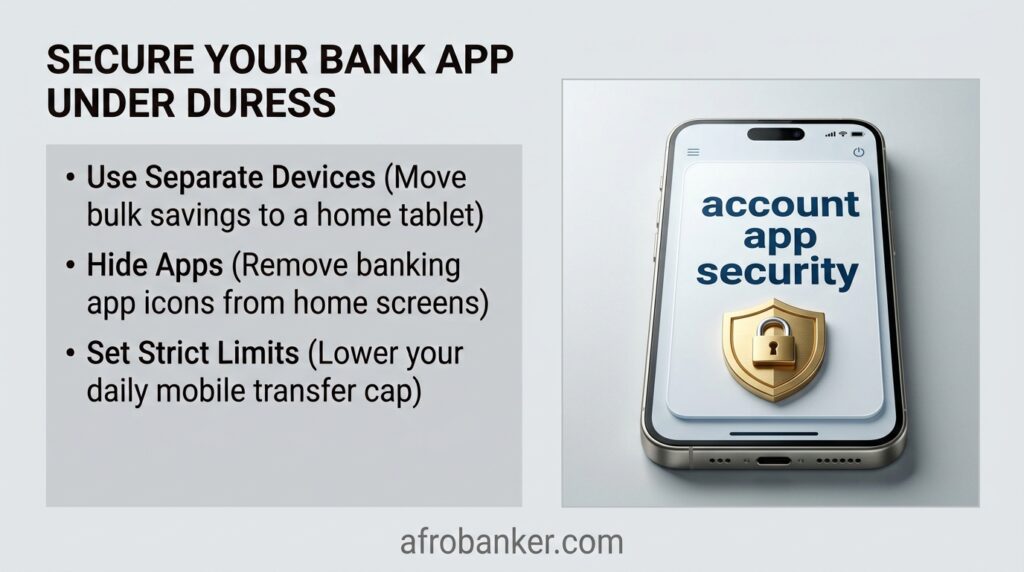
- The Two-Device Partition: Remove all high-value investment, corporate, and long-term savings apps from your daily smartphone. Install them exclusively on a dedicated tablet or secondary phone that remains locked in a secure home environment.
- Decoy Account Allocation: Keep only one mobile banking app on your primary phone. Maintain a low, sacrificial balance (e.g., matching a typical weekly spending budget) in this account. This serves as an acceptable payout to satisfy criminals under duress without wiping out your net worth.
- Biometric Fail-Safes: Disable automated biometric login (Face ID/Touch ID) for critical banking applications. Force the app to require a complex alphanumeric passcode that cannot be exploited simply by holding the phone up to your face.
How to Hide Bank Apps on iPhone & Android
Concealing the physical presence of financial platforms prevents criminals from auditing your device during a targeted robbery.
How to Hide Apps on iOS (iPhone):
- Remove from Home Screen: Long-press the banking app icon, select Remove App, and tap Remove from Home Screen. The app will only exist in your App Library.
- Disable Search & Siri Suggestions: Navigate to Settings > Siri & Search, scroll to your banking app, and toggle off Show App in Search, Show on Home Screen, and Suggest App. This prevents the app from appearing when a user swipes down to search the device.
- Utilize App Lock Folders: Group the app deep inside a multi-page utility folder labeled with a mundane title like “Calculators” or “System Files.”
How to Hide Apps on Android:
- Use Native Home Screen Settings: Long-press an empty space on your home screen, tap Home Screen Settings, select Hide Apps on Home and Apps Screens, check your banking apps, and tap Apply.
- Secure Folder Deployment (Samsung & Premium Android OS): Move all financial applications into the native Secure Folder or Private Space. This creates a hardware-encrypted, password-isolated vault that can be completely hidden from the main app drawer and requires an independent PIN to reveal.
Emergency Duress PIN for Banking Apps
Many retail banking users frequently look for a universal “panic code” or a reverse-PIN entry system at ATMs and mobile portals to automatically flag law enforcement.
- The Reality of Reverse-PINs: There is no universal emergency duress PIN system currently active across global commercial banking networks or automated teller machines. Speculation regarding entering your ATM PIN backward to trigger an silent police dispatch is a persistent myth.
- The Risk Factor: Financial institutions avoid implementing simple reverse-PIN or panic mode triggers because visible app delays, immediate account lockouts, or silent alarms can trigger violent retaliation from an aggressive perpetrator on-site.
Banking App Panic Mode and Duress Features
While a universal distress code does not exist, modern mobile operating systems and specific fintech applications feature proactive infrastructure to mitigate losses under duress.
- Apple iOS Stolen Device Protection: Turning on this native iOS feature ensures that if your device is away from familiar locations (like home or work), a strict one-hour security delay is mandatory before changing critical security settings, Apple ID passwords, or device passcodes. Furthermore, it strictly requires Face ID rather than allowing a numeric passcode fallback.
- Fintech Panic Balances: Select modern digital banks offer an engineered “Duress Mode.” When accessed via a specific secondary gesture or a secondary profile pin, the app displays a radically lower, pre-configured artificial balance while restricting high-volume outbound wire transfers.
How to Set Transfer Limits on Mobile Banking Apps
Restricting your maximum daily transactional bandwidth guarantees that even if a threat actor gains full access to an app dashboard, the immediate financial damage is heavily throttled.
- Step-by-Step Configuration: Log into your application, locate the Account Security, Card Control, or Profile Settings tab, and select Transaction Limits.
- Enforce Asymmetrical Constraints: Lower your daily electronic fund transfers (EFT), instant interbank settlements, and Point-of-Sale (POS) limits to the minimum operational amount you require for basic daily survival.
- The Authorization Lock: Ensure that any future request to increase these limits triggers a multi-hour verification hold or requires mandatory secondary approval via an off-device email link or a secure desktop web portal.
What to Do If You Are Forced to Transfer Money at Gunpoint
In an active, high-stress extortion or express kidnapping scenario, survival dictates your operational strategy.
- Prioritize Physical Survival Over Capital: Comply fully with financial demands. Do not argue, hesitate, or attempt to explain your bank limits or security layers. Financial losses are rectifiable through legal channels; physical harm is irreversible.
- Do Not Attempt Overt Deception: If a criminal spots an obvious attempt to lie about an account balance or bypass an app, it drastically escalates the threat of immediate violence.
- Observe and Memorize Details: Silently note contextual metadata—such as the exact timestamp of the forced transfer, destination account names displayed on screen, routing numbers, and specific terminology used by the perpetrators.
- Post-Incident Extraction: The moment you reach absolute safety, instantly contact your bank’s dedicated emergency fraud response hotline and specialized cybercrime law enforcement units to initiate an immediate administrative freeze on the recipient accounts.
Why Forced Transfers Are Becoming More Common
Criminals today do not always target physical cash. In many cases, they target smartphones, banking applications, and digitally accessible funds because these can provide access to significantly larger amounts of money. If you are also concerned about protecting your finances during physical attacks, kidnappings, or armed robberies, read our comprehensive guide on how to protect your bank money during a kidnapping or armed robbery.
Financial crime has evolved. Years ago, criminals primarily targeted:
- Cash
- Jewelry
- Vehicles
- Physical valuables
Today, smartphones often provide faster access to money than any safe, wallet, or ATM card. Most mobile banking applications contain:
- Balance information
- Transfer capabilities
- Savings products
- Investment products
- Beneficiary accounts
- Virtual cards
- Loan facilities
A criminal who gains control of a person’s device may immediately attempt to exploit these features. This shift is why mobile banking security should now be viewed as personal security. Protecting your banking app is no longer merely an IT concern, it is a financial survival skill.
The Most Important Rule: Protect Your Life First
Before discussing money, transfer limits, or banking apps, one principle must be established. Your life is worth more than your account balance. No amount of money is worth losing your life over. In stressful situations, people sometimes imagine they must protect every naira at all costs. That is a dangerous mindset because oney can potentially be:
- Earned again
- Saved again
- Invested again
- Recovered in some circumstances
Your life cannot. If you are faced with an immediate threat, your first objective should always be survival and safety and everything else comes after that. The strategies discussed in this article are designed to reduce financial damage before a crisis occurs, not encourage confrontation during one.
How to Secure Banking Apps Against Forced Transfers
This is one of the fastest-growing financial security concerns. The solution is not a single feature, protection comes from layers. Think of it as building multiple security doors between criminals and your money, if one layer fails, another layer remains.
The strongest protection combines:
- Transfer limits
- Account separation
- Device security
- Transaction alerts
- Banking app management
- Emergency response planning
No single control is sufficient by itself.
Layered security is what truly protects customers.
Separate Your Spending Money From Your Actual Wealth
One of the biggest mistakes people make is keeping all their money inside one account connected to one mobile banking application. This creates unnecessary exposure.
Imagine you have:
- Salary savings
- School fees
- Emergency fund
- Investment capital
- Daily spending money
all sitting in one visible account, that account becomes a single point of failure. Instead, consider dividing money into different purposes.
Create a Daily Spending Account
This account should contain only the money needed for:
- Daily transactions
- Food
- Transportation
- Utility bills
- Small transfers
How to Set Transfer Limits on Mobile Banking Apps
One of the most underrated banking security tools is the transfer limit. Many customers only think about transfer limits when they become an inconvenience. In reality, transfer limits can become one of your strongest defenses during a forced-transfer situation.
Why Transfer Limits Matter
Consider two customers. Customer A: Daily transfer limit of ₦5,000,000 and Customer B: Daily transfer limit of ₦100,000
If criminals gain access to both banking apps, which customer faces a larger potential loss? The answer is obvious. Transfer limits control exposure, they create a financial ceiling that cannot be exceeded without additional verification.
Review Limits Frequently
Many people increase limits temporarily and forget to reduce them afterward. Make it a habit to regularly review:
- Daily limits
- Transaction limits
- Transfer permissions
- Beneficiary limits
A lower limit provides an important layer of protection.
Enable Every Transaction Alert Available
Are Transaction Alerts Important?
Yes. Transaction alerts are one of the most important fraud-detection tools available to bank customers. Many victims only discover suspicious activity hours or days after the event. Every minute matters, the sooner suspicious activity is detected, the sooner action can be taken.
SMS alerts often work even when internet connectivity is unavailable while email alerts help create transaction records. Push notifications frequently deliver information instantly. Every alert channel creates an opportunity to detect unauthorized activity faster.
How to Hide Bank Apps on Android
While methods vary depending on device manufacturers and operating systems, some Android users choose to:
- Remove banking apps from the main home screen
- Place apps inside secured folders
- Use application privacy features
- Reduce app visibility
The goal is not complete invisibility, the goal is reducing immediate discovery. If someone quickly scans a device, visible banking apps may become obvious targets. Additional privacy measures can make access more difficult.
How to Hide Bank Apps on iPhone?
iPhone users may choose to:
- Remove apps from the Home Screen
- Store apps in the App Library
- Use Screen Time restrictions
- Limit app visibility through device settings
However, remember that app hiding should complement security measures, not replace them. Strong banking security always depends on multiple layers.
Use Strong Device Security
Most banking crimes begin with device access. This means your smartphone should be protected like a vault. Therefore, you should enable biometrics and use fingerprint authentication or face recognition. These features significantly increase security.
Use Complex Passwords
Avoid:
- Birth dates
- Sequential numbers
- Names
- Easily guessed combinations
Use Short Auto-Lock Times
A phone left unlocked creates unnecessary risk. Configure your device to lock quickly when inactive.
Keep Software Updated
Updates often contain important security patches. Outdated devices may contain known vulnerabilities.
Emergency Duress PIN for Banking Apps
One increasingly discussed concept is, “What Is an Emergency Duress PIN for Banking Apps?” A duress PIN is a special security feature designed to be used when a customer is under threat. In theory, a duress PIN could trigger certain protective actions while appearing normal to a criminal. Some security systems around the world use duress concepts in alarm systems, safes, and access controls.
However, availability varies significantly between financial institutions because many banking apps do not currently provide a specific customer-facing duress PIN feature. Because capabilities differ, customers should check directly with their financial institutions to understand available security options. Even where no duress feature exists, layered security controls remain essential.
Many retail banking users frequently look for a universal “panic code” or a reverse-PIN entry system at ATMs and mobile portals to automatically flag law enforcement.
- The Reality of Reverse-PINs: There is no universal emergency duress PIN system currently active across global commercial banking networks or automated teller machines. Speculation regarding entering your ATM PIN backward to trigger an silent police dispatch is a persistent myth.
- The Risk Factor: Financial institutions avoid implementing simple reverse-PIN or panic mode triggers because visible app delays, immediate account lockouts, or silent alarms can trigger violent retaliation from an aggressive perpetrator on-site.
Banking App Panic Mode/Duress Feature
Another emerging concept is “What Is Banking App Panic Mode? A banking panic mode or duress feature generally refers to security mechanisms designed to help customers respond during emergency situations.
Possible concepts discussed within the security industry include:
- Emergency account locking
- Temporary restrictions
- Silent alerts
- Emergency authentication workflows
Availability depends entirely on the institution and platform. Customers should never assume their banking app contains a panic feature unless the bank explicitly provides it.
The safest approach is maintaining preventive controls before an emergency occurs.
Never Store Banking Credentials on Your Phone
This remains one of the most common mistakes customers make.
Avoid storing:
- PINs
- Passwords
- Security questions
- Account details
inside:
- Notes apps
- Screenshots
- Messages
- Email drafts
If a phone becomes compromised, stored information can significantly increase risk. Treat your banking credentials the same way you would treat your house keys.
What Should I Do If Forced to Transfer Money at Gunpoint?
First, prioritize your personal safety, once safe:
Contact Your Bank Immediately
Report the situation, the earlier a report is made, the better.
Change Credentials
Update:
- Passwords
- PINs
- Login information
Freeze Compromised Access
Ask your bank about emergency restrictions.
Review Recent Transactions
Check for additional suspicious activity.
Document Everything
Record:
- Time of incident
- Transfer amounts
- Transaction references
- Relevant details
Fast action can be critical.
Build a Personal Emergency Banking Plan
Most people have insurance plans. Few people have banking emergency plans. Yet banking emergencies happen every day.
Ask yourself:
- Do I know my bank’s fraud hotline?
- Do I know how to block my ATM card?
- Do I know how to disable mobile banking?
- Do I know how to report suspicious transfers?
Preparation reduces panic.
Frequently Asked Questions (FAQs)
How do I secure my banking app against forced transfers?
Secure your banking app by setting transfer limits, enabling transaction alerts, using biometrics, separating savings from spending accounts, hiding sensitive apps, and creating an emergency response plan before a crisis occurs.
Can criminals access all my accounts through one banking app?
Potentially yes, depending on how your accounts are linked and how your bank structures mobile access. This is why account separation is an important security strategy.
Are lower transfer limits safer?
Yes. Lower transfer limits reduce potential losses and provide an additional layer of protection against unauthorized or forced transfers.
Should I hide my banking apps?
Hiding banking apps can reduce visibility and make immediate discovery more difficult, but it should be used together with strong security measures.
What is a banking duress feature?
A banking duress feature generally refers to an emergency security mechanism designed for situations involving threats or coercion. Availability varies by institution.
Can banks stop a forced transfer after it happens?
Outcomes vary based on timing, transaction type, reporting speed, investigation findings, and other factors. Immediate reporting gives the best opportunity for investigation.
Conclusion
Mobile banking has made managing money easier than ever before, but it has also changed the nature of financial risk. Protecting your mobile banking apps against forced transfers and duress requires more than simply choosing a strong password.
True protection comes from layered security:
- Separate accounts
- Lower transfer limits
- Transaction alerts
- Device security
- Hidden app strategies
- Emergency preparations
- Rapid incident reporting
After more than ten years in banking, one lesson continues to stand out: The customers who suffer the least financial damage during crises are usually those who prepared before the crisis happened.