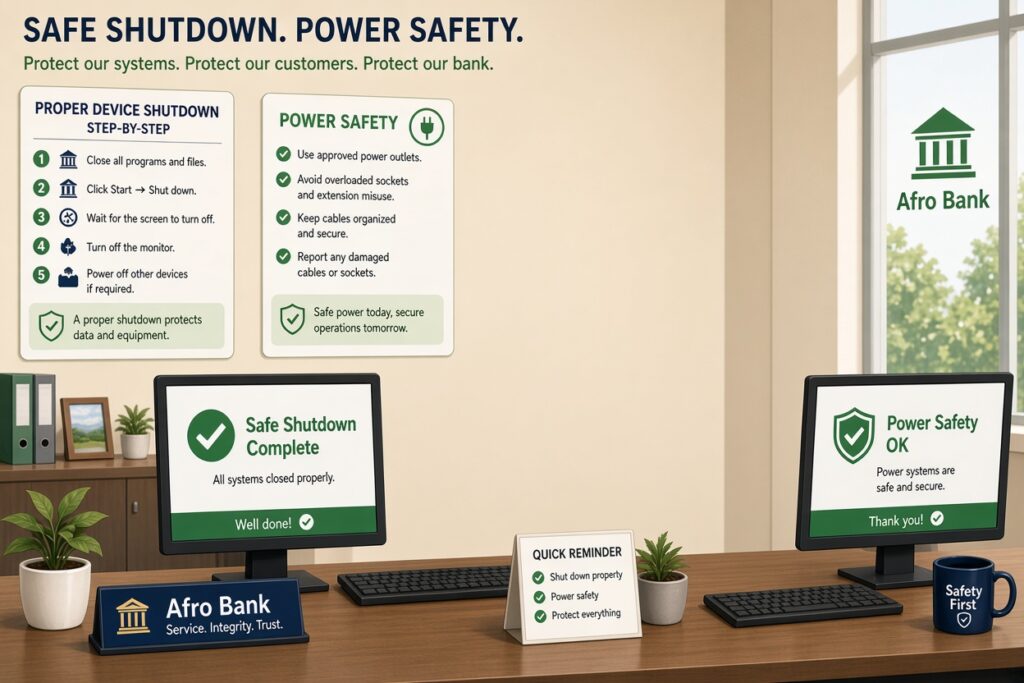
Proper device shutdown is critical for banks because it prevents transactional data corruption, protects sensitive financial hardware from electrical surges, and maintains cybersecurity compliance. When banking systems are turned off correctly, the operating system securely closes database connections, flushes transaction logs, and parks hardware components. An improper shutdown can leave financial ledgers unsynchronized, damage motherboards, and create temporary security vulnerabilities upon reboot.
Importance of Proper Device Shutdown and Power Safety In Banks
1. Protecting Financial Data and Preventing Ledger Mismatches
- Flushing the Cache: When a teller inputs a transaction, the system temporarily holds that data in volatile memory (RAM) before writing it permanently to the hard drive. A Proper Device Shutdown ensures that all pending data is safely committed to the disk.
- Avoiding Asymmetric States: If power is cut mid-transaction, a database can enter an asymmetric state, where money is deducted from one account but not credited to the other. Resolving these errors requires manual audits, costing banks time and lowering customer trust.
2. Safeguarding Hardware Longevity and Critical Infrastructure
| Power Threat | Impact on Hardware | Preventive Solution |
|---|---|---|
| Abrupt Power Cuts | Causes read/write heads on older drives to crash and corrupts solid-state drive (SSD) controller firmware. | Proper Device Shutdown commands via automated software scripts. |
| Voltage Surges | Fries delicate microchips on motherboards when power abruptly returns. | Heavy-duty surge protection arrays and localized Uninterruptible Power Supplies (UPS). |
| Thermal Trapping | Traps residual heat inside server chassis because cooling fans stop instantly. | Allowing systems to run their programmatic cooling cycles during a standard power-down. |
3. Eliminating Cybersecurity Vulnerabilities
- Vulnerable Boot Configurations: When a computer crashes due to a sudden power loss, it often reboots into a “Safe Mode” or recovery environment. In these states, standard endpoint security software, firewalls, and active monitoring tools may fail to launch automatically, leaving a temporary window open for malicious local access.
- Log File Gaps: Security Information and Event Management (SIEM) systems rely on a constant, uninterrupted stream of data logs from every banking terminal. An improper shutdown truncates these logs unexpectedly, leaving security teams blind to system states right before the failure occurred.
4. Power Safety Best Practices for Financial Institutions
- Deploy Smart UPS Systems: Every terminal and server must be plugged into an Uninterruptible Power Supply (UPS). These backup batteries should feature automated signaling software. If main grid power fails, the UPS commands the operating system to initiate a Proper Device Shutdown before the battery runs completely dry.
- Centralized Group Policies: Network administrators should configure centralized system policies that automatically trigger a clean, programmatic shutdown on all non-essential branch computers at the official close of business.
- Regular Emergency Power Drills: Branch managers and IT teams must routinely test backup generators and UPS batteries under simulated load conditions. This ensures that the transition from the main power grid to backup systems happens seamlessly without dropping active terminal sessions.
Why Should We Shut Down the Computer Safely?
Proper computer shutdown is essential in banking because banking systems process sensitive customer information, financial transactions, and confidential records. A safe shutdown allows applications to close properly, saves unsaved data, and ensures that system files are written correctly to storage before power is removed. Improper shutdowns can cause data corruption, transaction errors, system instability, and even security vulnerabilities.
In a banking environment, a sudden shutdown could interrupt transaction processing, damage databases, or prevent successful synchronization with central banking systems. Safe shutdown procedures help maintain data integrity, regulatory compliance, and uninterrupted banking operations.
What Is the Safest Way to Shut Down a Computer?
The safest way to shut down a computer is to:
- Save all open work.
- Close running applications.
- Click the operating system’s Shut Down option.
- Wait until the computer powers off completely.
- Turn off connected equipment only after shutdown is complete.
Using the operating system shutdown command allows the computer to safely close processes and write cached data to storage before power is disconnected.
What Are 5 Security Measures?
For banking environments, the most important security measures include:
1. Strong Password Policies
Passwords should be complex, unique, and changed periodically.
2. Multi-Factor Authentication (MFA)
Users must provide additional verification beyond passwords.
3. Antivirus and Endpoint Protection
Protects devices from malware, ransomware, and malicious software.
4. Access Control
Employees should only access systems necessary for their roles.
5. Proper Device Shutdown
Ensures systems are secured after business hours and reduces unauthorized access risks.
What Is the Most Secure Device for Online Banking?
A secured computer or smartphone with:
- Updated operating system
- Antivirus software
- MFA enabled
- Encrypted storage
- Trusted banking applications
is generally the safest option.
For banking staff, corporate-managed devices with endpoint protection and security monitoring are the most secure.
What Are the 5 Steps to Shut Down a Computer?
Step 1: Save Your Work
Ensure all documents and transaction records are saved.
Step 2: Close Programs
Exit all applications properly.
Step 3: Open the Power Menu
Select the operating system power options.
Step 4: Choose Shut Down
Select “Shut Down.”
Step 5: Wait for Complete Power-Off
Do not disconnect power until the system has fully shut down.
What Happens If You Don’t Shut Down Your Computer?
Failure to shut down computers regularly can result in:
- Reduced performance
- Software glitches
- Increased energy consumption
- Delayed security updates
- Overheating
- Memory leaks
- Greater cybersecurity exposure
In banks, systems left running unnecessarily may become targets for unauthorized access.
Is It Okay to Shut Down a Laptop With a Power Button?
Yes, if the power button is configured to perform a normal shutdown. However, holding the power button down to force the laptop off should only be used during emergencies such as system freezes because it may result in data loss or corrupted files.
What Are 10 Important Computer Safety Measures to Take?
1. Use Strong Passwords
2. Enable MFA
3. Install Antivirus Software
4. Update Software Regularly
5. Back Up Data Frequently
6. Lock Systems When Unattended
7. Avoid Unknown Links and Attachments
8. Use Surge Protectors and UPS Devices
9. Encrypt Sensitive Information
10. Shut Down Devices Properly
Together, these measures significantly reduce operational and security risks in banks.
What Are the 7 Types of Security?
- Physical Security
- Network Security
- Information Security
- Application Security
- Cloud Security
- Endpoint Security
- Operational Security
Banks rely on all seven layers to protect customer funds and information.
What Are the 5 C’s in Security?
A common framework includes:
Confidentiality
Protecting sensitive information.
Compliance
Meeting regulatory requirements.
Continuity
Maintaining uninterrupted operations.
Control
Managing access and permissions.
Cybersecurity
Defending against digital threats.
These principles are especially important in highly regulated industries such as banking.
Can Power Shutdown Damage a PC?
Normal shutdowns do not damage computers.
What causes damage is:
- Pulling out power cables
- Power surges
- Repeated forced shutdowns
- Sudden power outages
These actions can corrupt files and shorten hardware lifespan.
Is It Better to Shut Down Your PC or Leave It On?
For banking operations, shutting down workstations after business hours is generally better.
Benefits include:
- Improved security
- Reduced energy costs
- Lower hardware wear
- Installation of updates
- Reduced cyber threats
Critical banking servers may remain operational, but employee workstations should generally be shut down when not in use.
How to Shut Down a Computer Without a Monitor?
Options include:
- Using the power button configured for safe shutdown
- Keyboard shortcuts
- Remote administration tools
- Command-line shutdown commands
These methods allow safe shutdown even when a display is unavailable.
What Are the Four Pillars of Security?
Confidentiality
Information is only accessible to authorized persons.
Integrity
Data remains accurate and unaltered.
Availability
Systems remain accessible when needed.
Accountability
Users can be held responsible for actions performed on systems.
What Are Five Types of Computer Security?
- Network Security
- Endpoint Security
- Application Security
- Information Security
- Cloud Security
Each plays a role in protecting banking infrastructure.
What Are the Five Pillars of Security?
- Confidentiality
- Integrity
- Availability
- Authentication
- Non-Repudiation
Together these ensure secure banking transactions and record keeping.
What Is Another Name for Computer Security?
Computer security is commonly known as:
- Cybersecurity
- Information Security (InfoSec)
- IT Security
All refer to protecting digital systems and information from threats.
What Is the Best Security System for a Computer?
No single tool provides complete protection. The best security setup combines:
- Antivirus software
- Firewalls
- MFA
- Encryption
- Security monitoring
- Operating system updates
- User awareness training
This layered approach is often called Defense in Depth.
What Are the Three Main Elements of Computer Security?
The three main elements are:
Confidentiality
Protect sensitive information.
Integrity
Maintain data accuracy.
Availability
Ensure systems remain accessible.
These form the CIA Triad, a foundational information security model. [youtube.com]
What Are the 5 Basic Components of a Computer System?
1. Input Devices
Keyboard, mouse, scanner.
2. Output Devices
Monitor, printer.
3. CPU
Processes instructions.
4. Memory
Stores temporary data.
5. Storage
Stores programs and files permanently.
Proper shutdown protects all these components.
What Are the 8 Main Components of a Computer?
- CPU
- Motherboard
- RAM
- Storage Drive
- Power Supply Unit
- Input Devices
- Output Devices
- Network Interface
Power safety practices help preserve the lifespan of these components.
What Are the Five Parts of a System?
- Input
- Processing
- Storage
- Output
- Control
Every banking system depends on these processes to function correctly.
What Are the 5 Basic Functions of a Computer?
Input
Accepting data.
Processing
Performing calculations.
Storage
Saving information.
Output
Providing results.
Control
Managing all system operations.
Improper shutdown can affect all five functions by causing hardware or software issues.
The Hidden Risk: Power Surges and Overnight Damage
- Burnt power supplies to PCs, ATM, system/control rooms etc.
- Damaged motherboards of PCs
- Corrupted storage drives
- Total system failure/downtime. This has been an everyday day scenario, which has been reported by different bank branches.
Why Unplugging Devices Matters After Work
The Financial Impact on Bank Branches
The Often-Ignored Risk (Interrupting System Updates)
What happens when updates are interrupted? When systems are shut down abruptly while updates are running, it can result in Corrupted Operating System (OS), damaged application files, system boot failures and loss of important configurations. In severe cases, systems may require full reinstallation technical intervention and downtime that affects branch operations.
Best Practices for Safe Device Handling in Banks
Frequently Asked Questions (FAQs)
Why is proper device shutdown important in banks?
It protects customer data, prevents system corruption, reduces security risks, and ensures smooth banking operations.
Can an improper shutdown affect banking transactions?
Yes. Sudden shutdowns can interrupt transaction processing, database updates, and synchronization with banking servers.
What role does a UPS play in banking power safety?
A UPS provides temporary backup power, allowing systems to shut down safely during power outages.
Should bank computers be turned off every day?
Generally, yes. Workstations should be shut down after business hours unless operational requirements dictate otherwise.
Can sudden power outages damage banking equipment?
Yes. Power interruptions can cause data loss, hardware damage, and software corruption.
What is the biggest security risk of leaving computers on overnight?
Unauthorized access, malware infections, and exploitation of unpatched vulnerabilities.
Who is responsible for device shutdown in a bank?
Every employee should follow shutdown procedures, while IT teams should oversee compliance and power safety policies.
How does proper shutdown improve cybersecurity?
It closes active sessions, reduces attack surfaces, ensures security updates are applied, and minimizes opportunities for unauthorized access.
What devices should be protected by power safety measures in banks?
Computers, servers, routers, switches, ATMs, printers, POS devices, and network equipment.
How can banks improve power safety?
By using UPS systems, surge protectors, backup generators, preventive maintenance programs, and staff training on proper shutdown procedures.