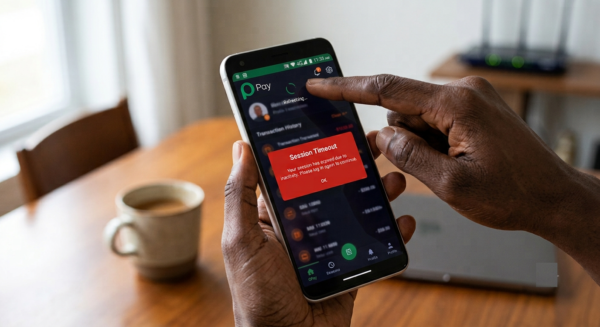
There is nothing more frustrating than trying to make an urgent financial transfer, only to be kicked out by your banking application. If you opened your OPay app today to send money, pay a bill, or check your balance, and you were greeted with a frustrating “Session Timeout” error message, you are not alone.
When this happens, the natural instinct is to panic. You might wonder if your account has been compromised, if your mobile data is failing, or if your hard-earned money has vanished into thin air.
As a professional banking specialist, let me reassure you immediately: your funds are completely safe. A session timeout error is a built-in security and technical mechanism, not a sign of a hacked account.
In this comprehensive guide, I will break down exactly why your OPay app is timing out today, the hidden network issues triggering the error, and five immediate steps you can take on your phone right now to bypass the glitch and regain access to your money.
Quick Fix Summary: If OPay is showing a Session Timeout today:
1. Clear the OPay App Cache (Settings > Apps > OPay > Storage > Clear Cache).
2. Toggle Airplane Mode ON for 15 seconds to refresh your internet connection.
3. Check Google Play Store / App Store for a pending OPay update.
What Exactly is a Session Timeout in Digital Banking?
To fix the problem, you must first understand why the app is shutting you out. In digital banking architecture, a “session” begins the exact second you input your password, passcode, or fingerprint biometric to log into your account.
Every session is protected by an invisible countdown timer controlled by OPay’s central servers. If the application detects that communication between your smartphone device and the banking database has been disrupted or delayed for too long, it automatically terminates the connection.
This is an intentional security safeguard. If you accidentally leave your phone unlocked on a table, the app will log you out automatically after a minute or two to prevent a stranger from accessing your wallet.
However, when you receive a “Session Timeout Today” error right at the moment of logging in or completing a transfer, it means something is breaking the communication pipeline between your phone and OPay.
The 4 Root Causes Behind the OPay Session Timeout Today
When thousands of users experience app timeouts simultaneously, the issue usually boils down to four primary technical triggers:
1. Extreme Inter-Bank Network Congestion (NIBSS Glitches)
In Nigeria, all digital bank transfers travel through a central gateway managed by the Nigeria Inter-Bank Settlement System (NIBSS). During peak hours, such as month-end salary periods, festive seasons, or nationwide network downtimes, millions of transaction requests hit the NIBSS servers at the exact same time. If OPay’s servers try to validate your login credentials or process a transfer but cannot get a timely response from the central clearing switch, the app cuts the connection to protect your profile from a hanging error, resulting in a timeout.
2. Corrupted Local App Cache
Every time you open your OPay app, your smartphone saves tiny temporary files called “cache.” These files help the app load your profile and recent transactions faster without downloading everything from scratch. Over time, these temporary files can become fragmented, outdated, or corrupted. A clogged cache will confuse the application, causing it to freeze on a processing loop until it triggers a session timeout error.
3. Outdated OPay App Versions
Fintech platforms operate in a highly volatile cybersecurity environment. OPay frequently rolls out emergency backend security updates and software patches to protect users from fraud. If your phone is running an older version of the app, OPay’s central servers will reject your login request because your device lacks the latest security protocols.
4. Unstable Local Mobile Network (ISP Throttling)
Sometimes the fault lies directly with your mobile telecommunications network provider. Even if your phone displays full 4G or 5G network bars, your internet service provider might be experiencing a brief data routing failure. If your data packets drop for even three seconds while OPay is trying to establish a secure connection, the app will timeout for safety reasons.
How to Fix the OPay Session Timeout Error: A Step-by-Step Guide
If the app is malfunctioning right now, follow these field-tested troubleshooting steps to restore your connection immediately:
Step 1: Force Close and Clear the OPay App Cache
Do not just minimize the app; you need to wipe its temporary memory.
-
- For Android Users: Go to your phone’s Settings, click on Apps or Applications, select OPay, tap on Storage, and click Clear Cache. Be careful not to click “Clear Data,” as that will log you out completely and require you to re-verify your phone number.
- For iPhone Users: Because iOS does not have a manual cache button, swipe up from the bottom of your screen to open the app switcher, find OPay, and swipe it completely away to force close it. Then, restart your device to refresh the RAM.
Step 2: Perform a Hard Network Toggle
A minor glitch in your phone’s cellular antenna can block secure banking connections. Swipe down your phone’s notification panel and turn on Airplane Mode. Wait for roughly 15 seconds, then turn it off. This forces your mobile device to disconnect from the current cellular tower and re-establish a fresh, clean data connection with the closest mast.
Step 3: Check for Mandatory Updates on Play Store or App Store
Open your Google Play Store or Apple App Store, search for “OPay,” and check if there is an active green button that says Update. If there is, download the update immediately. Running an outdated fintech app is the number one cause of unexpected server rejection timeouts.
Step 4: Switch Your Internet Connection
If you are using mobile data (such as MTN, Airtel, Glo, or 9mobile) and the app is timing out, try switching to a local Wi-Fi connection if available. Conversely, if you are on Wi-Fi, turn it off and try your mobile data. Often, changing your IP routing path bypasses localized network blockages instantly.
What to Do if Money Was Deducted During a Timeout Error
The absolute biggest fear during a session timeout is seeing a debit alert without the recipient getting credited. If you initiated a transfer, the app timed out, and your money disappeared, do not panic. Follow this banking protocol:
Understand the 24-Hour Auto-Reversal Window
When a transaction fails due to a session timeout, the money is usually held in a “suspense account” at the switching level. If the beneficiary bank does not confirm receipt within minutes, the system logs it as an incomplete transaction. The automated system is designed to reverse this money back into your OPay wallet within 24 business hours.
Log an In-App Dispute Immediately
Do not wait for customer care to pick up the phone. Once the app stabilizes and allows you to log back in, go to your Transaction History, tap on the specific failed transaction that showed the timeout error, and click on Report an Issue or Log Dispute. This automatically creates an internal tracking ticket tied to your transaction reference number.
Use Only Verified Customer Care Channels
If you must contact OPay via social media for an escalation, be incredibly careful. Fraudsters create fake customer support accounts on platforms like X (formerly Twitter) to prey on panicked banking customers. Only interact with pages that have the official verified blue or grey checkmarks, and never give out your login password, PIN, or OTP to anyone claiming to work for OPay.
Frequently Asked Questions
Does a session timeout mean my OPay account has been hacked?
No. A session timeout is simply a communication breakdown between your smartphone and the bank’s servers. It indicates that the connection timed out before data could be completely processed, not that an unauthorized person has breached your account security.
Why is my OPay app showing a session timeout today but working on my friend’s phone?
This usually points to a localized issue on your device, such as a corrupted app cache, an outdated app version, or your specific mobile network carrier experiencing data routing issues in your immediate neighborhood. Following the cache clearing steps above will usually fix this.
Can I use the OPay USSD code if the app keeps timing out?
Yes. If the smartphone app is failing due to a server or data network issue, you can dial the official OPay USSD code (*955#) from your registered phone number. The USSD gateway operates on a separate telecommunications channel and will often process transfers smoothly even when the mobile app is experiencing a temporary glitch.
How do I fix OPay system error?
System errors usually mean OPay’s servers are busy. Try clearing cache, updating the app, or waiting a few minutes before retrying.
How can I remove restrictions on OPay app?
Restrictions often come from incomplete KYC. Upload a valid ID, BVN, and proof of address in the app to unlock full access.
Why is my OPay app not loading today?
This could be due to poor internet, outdated app version, or temporary server downtime. Check OPay’s official social media for outage updates.
Is OPay having network issues today?
Yes, sometimes OPay experiences downtime. If many users are reporting problems, it’s likely a network issue on their side.
What is session ID in OPay?
A session ID is a temporary code that identifies your login session. When it expires, you get a “session timeout” message.
Is there an issue with OPay?
Occasionally, yes. Server maintenance or upgrades can cause temporary disruptions.
How do I unlock my OPay app?
Complete your KYC verification, reset your password if needed, and contact OPay support if restrictions remain.
How to identify a fake OPay receipt?
Check the transaction ID and confirm it in your OPay app. Fake receipts often have spelling errors or missing transaction codes.
Why did OPay freeze my account?
Accounts are frozen if suspicious activity is detected or if KYC documents are missing. Contact support to resolve it.
What is the full name of OPay?
OPay stands for Opera Pay, a mobile payment platform launched by Opera.
I can’t log into my OPay account. What can I do?
Reset your password, check your internet, and ensure your SIM card is active. If all fails, contact OPay customer service.
Can I open 2 OPay accounts?
No, OPay allows only one account per BVN and phone number.
Conclusion
Session timeout errors on OPay are annoying but rarely serious. With quick fixes like refreshing your app, clearing cache, or updating your details, you’ll be back to transacting in minutes. And if the issue is on OPay’s side, patience and checking official updates will save you stress.
Are you still unable to open your app or facing a pending transaction that hasn’t been reversed? Drop your experience in the comments section below, specify your phone type and network provider, and I will gladly assist you troubleshoot it step-by-step!

Leave a Reply