
How Do You Recover a Failed Wamd Transfer in Kuwait?
To recover a failed Wamd transfer in Kuwait, first verify the transaction status in your banking app, check whether your account has been debited, wait for the bank’s automatic reversal process, contact customer support if the funds are not returned within the stated timeframe, and keep evidence such as transaction receipts and reference numbers. Most failed Wamd transfers are either completed successfully or automatically reversed back to the sender’s account.
How to Recover a Failed Wamd Transfer in Kuwait (Step-by-Step Guide)
Digital payments have transformed banking in Kuwait. Among the most popular innovations is Wamd, an instant payment service that allows users to send money using a mobile phone number instead of traditional bank account details.
While Wamd transfers are designed to be fast and convenient, issues can occasionally arise. You may encounter a situation where a Wamd transfer remains pending, fails unexpectedly, or results in your account being debited without the recipient receiving the funds.
As a banking professional, I have seen many cases where customers panic after a failed transfer because their account was debited but the recipient was not credited. In most situations, the funds are recovered through bank reconciliation and reversal processes.
Experiencing a failed Wamd transfer in Kuwait can be stressful, especially when the money is urgently needed. The good news is that most failed Wamd transactions can be resolved through a straightforward process.
This guide explains how to recover a failed Wamd transfer in Kuwait, why transactions fail, how long reversals typically take, and the practical steps you can take to get your money back.
Author Experience and Banking Perspective
As a banking professional with hands-on experience in transaction processing, customer service, compliance procedures, and payment-related investigations, I understand the anxiety that comes when money leaves a customer’s account but the recipient does not receive the funds.
One of the most common misconceptions is that a failed transfer automatically means the money has disappeared. In reality, electronic payment systems maintain detailed transaction records, reconciliation processes, and audit trails that help banks locate and resolve most failed transactions.
Throughout my banking career, I have seen cases where customers panicked after a failed transfer, only for the funds to be automatically reversed after system reconciliation. Understanding how payment systems work can help you avoid unnecessary stress and take the correct recovery steps when a Wamd transfer fails.
What Does “Wamd” Mean??
Before discussing recovery procedures, it is important to understand what Wamd is.
Wamd is an instant payment service available through participating Kuwaiti banks. The service enables customers to transfer funds using registered mobile phone numbers rather than entering full bank account details.
The goal of Wamd is to make domestic money transfers quicker, safer, and easier.
Understanding Wamd Within Kuwait’s Banking System
Wamd operates within Kuwait’s modern digital payment infrastructure and is supported through participating financial institutions.
Many residents and expatriates use Wamd through banks such as:
- Kuwait Finance House (KFH)
- National Bank of Kuwait (NBK)
- Boubyan Bank
- Gulf Bank
- Commercial Bank of Kuwait
- Burgan Bank
- Al Ahli Bank of Kuwait
Because Wamd is integrated directly into participating banking platforms, transaction issues are usually handled through established banking reconciliation and dispute-resolution procedures rather than informal payment recovery methods.
This is why most failed Wamd transfers can be traced and investigated when proper transaction details are available.
Note:
- WAMD is an instant payment service available through participating Kuwaiti banks.kfh+1
- KFH states WAMD allows sending and requesting money using a verified mobile number.kfh+1
- KFH and CBK-published service pages state transaction limits of KD 1 minimum, KD 1,000 maximum per transaction, KD 3,000 daily, and KD 20,000 monthly for their implementations of WAMD.kfh+2
- WAMD operates through KNET and is part of Kuwait’s instant payments infrastructure.kfh+2
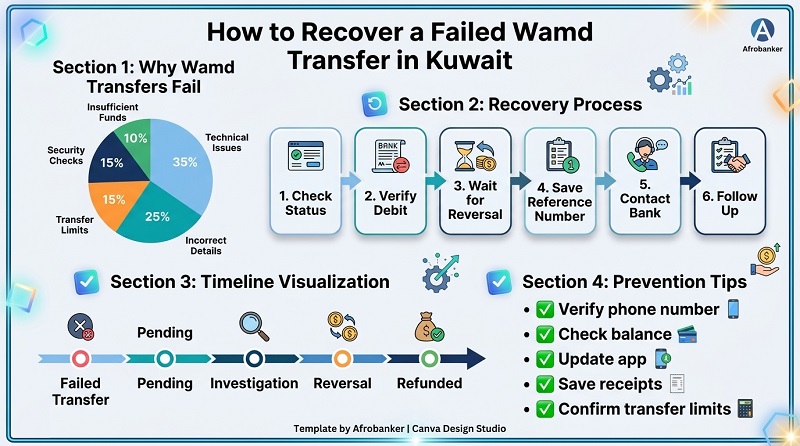
Why Does a Wamd Transfer Fail?
Several factors can cause a failed Wamd transfer in Kuwait.
1. Network or System Downtime
Occasionally, maintenance or temporary technical issues can affect transaction processing.
2. Incorrect Recipient Information
Entering an unregistered or incorrect phone number may prevent successful processing.
3. Insufficient Funds
If your account balance is lower than the transfer amount, the transaction may fail immediately.
4. Security Restrictions
Banks may block transactions that appear unusual or suspicious.
5. Exceeded Daily Transfer Limits
Exceeding the bank’s allowable transaction limits can result in a rejected transfer.
6. Temporary Banking App Issues
System glitches, mobile app errors, or connectivity problems can interrupt payment processing.
How to Recover a Failed Wamd Transfer in Kuwait
Imagine this scenario where a Nigerian expatriate in Kuwait sending 150 KWD to a family member through Wamd. The account is debited but the recipient receives nothing. The first step should be checking the transaction status before assuming the money is lost. Follow these steps immediately if your Wamd transfer fails.
Step 1: Verify Transaction Status
Open your bank’s mobile banking app and review your recent transaction history.
Look for statuses such as:
- Successful
- Pending
- Failed
- Reversed
- Cancelled
The status will help determine the next course of action.
Step 2: Check Whether Your Account Was Debited
A failed Wamd transfer can occur in two ways:
Scenario A: No Debit
The transfer fails and no money leaves your account. In this case, no recovery action is needed.
Scenario B: Account Debited
The money leaves your account, but the recipient does not receive it. This is the situation that usually requires reversal or investigation.
Step 3: Wait for Automatic Reversal
Most participating banks have automated reconciliation systems. When a transfer fails after funds are debited, the system often detects the error and automatically returns the money.
How Long Does It Take for a Failed Transaction to Be Reversed?
Many failed digital transactions are automatically reversed after processing checks are completed. Many failed transactions takes 1 to 3 working days before the money automatically drops back into your account. Reversal times vary depending on:
- The bank involved
- System conditions
- Transfer processing status
- Technical issues
“For a deeper understanding of why digital banking transactions fail and how banks process refunds, read our guide on Kuda Bank Failed Transfer Auto Reversal Time.”
Step 4: Keep the Transaction Reference Number
Never delete the transfer confirmation. Always keep or screenshot the following:
- Transaction ID
- Reference number
- Date and time
- Amount transferred
- Screenshots
These details can help support teams trace your transfer faster.
Step 5: Contact Your Bank
If the transfer remains unresolved after a reasonable period, contact your bank immediately.
Provide:
- Account number
- Mobile number
- Reference number
- Transfer amount
- Recipient phone number
This enables the bank to investigate the failed Wamd transaction.
Step 6: Follow Up Until Resolution
Some transfer investigations may require follow-up.
Keep communication records, emails, chat logs, and support ticket numbers until the transaction is resolved.
A Chart Recovery Flow
How Do I Get My Money Back From a Failed Online Transaction?
The recovery process generally involves:
- Confirming the transaction failed.
- Waiting for automatic reversal.
- Contacting customer support if funds remain outstanding.
- Providing transaction evidence.
- Requesting formal investigation where necessary.
The majority of genuine failed electronic transactions are eventually traced and resolved.
How to Fix a Failed Transaction
If your Wamd transfer fails, try the following:
- Check internet connectivity.
- Update your banking application.
- Verify recipient information.
- Ensure sufficient account balance.
- Retry the transaction later if systems are unavailable.
- Contact customer support when errors persist.
How Long Will a Failed Transaction Stay Pending?
A pending transaction can remain under review while payment systems confirm whether the transfer should proceed or be reversed.
WAMD Instant Transfers
-
- Timeline: Immediate (under 30 minutes).
- How it works: Under strict regulations enforced by the Central Bank of Kuwait, WAMD is an instant network. If a system failure happens, it cannot stay pending. Banks face severe tiered penalties if a WAMD transfer hangs for more than 4 minutes, meaning any technical glitch results in an almost immediate auto-reversal.
KNET Debit Card Transactions
-
- Timeline: 1 to 3 working days.
- How it works: If you buy something online or at a store POS terminal using your KNET debit card and the terminal errors out, the funds are usually placed on hold. KNET’s automated interbank settlement clears these errors quickly, releasing the pending hold back to your available balance within 72 hours.
Credit Cards (Visa / MasterCard)
- Timeline: 3 to 7 working days (Can take up to 10–30 days for international sites).
- How it works: Credit card networks take longer to drop an authorized hold. The merchant’s bank must formally communicate back to your local bank (like NBK or KFH) that they are not claiming the money. If the merchant ignores it, the hold will automatically expire and drop off after a week.
Factors affecting pending status include:
- Banking system congestion
- Technical maintenance
- Inter-bank communication delays
- Compliance checks
If the pending status remains unusually long, contact your bank for clarification.
How to Send Money Using Wamd
Although the exact process may vary between banks, the general procedure involves:
- Opening your mobile banking application.
- Selecting the Wamd service.
- Choosing a registered recipient.
- Entering the transfer amount.
- Confirming the transaction.
The recipient typically receives funds directly through the linked banking service.
Wamd Transfer Limits in Kuwait
What Is the Maximum Amount I Can Transfer Using Wamd?
Transfer limits may vary from one participating bank to another and may also change over time. Therefore, keep these important limits in mind once your registration is complete:
- Minimum Transfer: KD 1
- Per Transaction: Maximum of KD 1,000
- Daily Limit: Maximum of KD 3,000
- Monthly Limit: Maximum of KD 20,000
What Restrictions Apply to the Wamd Payment Service?
Common restrictions may include:
- Daily transaction caps
- Monthly transfer limits
- Mobile number registration requirements
- Participation only through supported banks
- Compliance and anti-fraud controls
These measures help protect both customers and financial institutions.
Wamd Registration and Activation Questions
How to Activate Wamd in KFH?
Many first-time users search for registration procedures. To activate wamd, customers should use the official KFH mobile banking platform and follow the activation instructions provided within the banking application. It provides access to over 200 digital banking services. You can download the official application across all major storefronts:
- For iOS users via the Apple App Store
- For Android users via the Google Play Store
- For Huawei users via the Huawei App Gallery
How to Register Wamd Kuwait NBK?
Registration is typically completed through the official banking channels provided by the bank. To register for the WAMD Instant Payment service through the National Bank of Kuwait (NBK), user must complete the setup directly inside the bank’s official application.
-
- Log in to your updated NBK Mobile Banking App.
- Navigate to the main menu and select the “Transfers” tab.
- Tap on “WAMD” from the list of transfer methods.
- Choose the Kuwaiti Dinar account you want to link to the service to send and receive your funds.
- Verify your registered mobile number, read and accept the Terms and Conditions, and confirm using the verification code (OTP) sent to your device.
Can I Transfer Money From Kuwait to Another Country?
Wamd primarily supports domestic transfers within participating financial institutions. For international money transfers, customers typically use:
- Bank wire transfers
- Remittance services
- International payment platforms
Can I Transfer Money From Kuwait to Nigeria?
Yes, but the money must be sent as a direct bank deposit (delivered in Naira via Nigeria’s instant NIP bank network). However, international transfers generally require services specifically designed for cross-border payments rather than domestic transfer platforms. Transfer options may include:
- Bank transfers
- International remittance providers
- Licensed money transfer operators
Always compare exchange rates, fees, transfer speed, and compliance requirements before sending money abroad.
-
- Al Mulla Exchange App: Offers direct transfers to Nigeria via the Mastercard HomeSend service, ensuring fast processing times.
- Al Muzaini Exchange App: Provides seamless 24/7 bank-to-bank international remittances directly to Nigerian bank accounts from your phone.
Best Money Transfer Apps in Kuwait
What Is the Best Money Transfer App in Kuwait? The answer depends on individual needs, and factors to consider include:
- Transfer speed
- Security
- Fees
- User experience
- International payment options
- Customer support
The best application is often the one that best matches your personal banking requirements and they are:
- The Unified Instant Payment Service – WAMD
- Contactless & Global Mobile Wallets
- Fintech & Specialized Bill Payment Apps
- Remittance & International Transfer Apps
Online Payment App Is Used in Kuwait
Several banking and payment applications operate within Kuwait’s digital banking ecosystem. Availability depends on participating financial institutions and customer eligibility. Below are online payment app used in kuwait:
1. The Unified Instant Payment Service: WAMD
-
- How to use it: You simply log into your existing bank’s app such as NBK Mobile Banking, KFH Online, or the CBK Mobile App and locate the “WAMD” tab to execute zero-fee local transfers.
2. Contactless & Global Mobile Wallets
-
- Apple Pay: Exceptionally popular across the country for iOS and Apple Watch users. It is natively linked with local KNET debit cards as well as international credit cards.
- Google Wallet / Google Pay: Widely supported across Android devices in Kuwait. Major institutions like the Kuwait Finance House (KFH) fully integrate with Google Wallet for seamless smartphone tap-to-pay.
- Samsung Pay: Another dominant player for Samsung Galaxy ecosystem users looking for cardless terminal checkout.
3. Fintech & Specialized Bill Payment Apps
-
- eNet Pay: One of Kuwait’s oldest dedicated payment applications. It is widely used by locals and expats to top up mobile accounts, settle internet subscriptions, pay school fees, and manage civil or financial installments via KNET or credit cards.
- Kwik Pay: A newer-generation fintech mobile wallet designed for secure P2P transfers using a phone number, request-to-pay triggers, and automated car-based payments.
- AZ eWallet: A secure digital wallet app that lets users open a mobile financial account quickly, request a physical prepaid card for international/local shopping, and track daily expenditures.
- Og Money (formerly Payit): A highly rated comprehensive mobile wallet in Kuwait utilized heavily for micro-payments, entertainment vouchers, utility bills, and rapid money transfers.
- My Fatoorah: While primarily an invoice and payment gateway platform for businesses, its client-facing links are universally recognized by residents for executing rapid click-to-pay links received over WhatsApp or SMS.
4. Remittance & International Transfer Apps
- Al Mulla Exchange App: The top financial remittance app in the country, processing billions in cross-border transfers directly through KNET checkouts.
- Al Muzaini App & LuLu Money: Highly reliable alternative remittance platforms for tracking live exchange rates and sending multi-currency wire transfers abroad
How to Prevent Future Wamd Transfer Failures
To reduce the risk of failed Wamd transfers:
- Always verify recipient details carefully.
- Ensure your account has sufficient funds.
- Keep your banking application updated.
- Avoid sending transfers during reported service interruptions.
- Always save transaction receipts.
- Confirm transfer limits before sending large amounts.
- Use a stable internet connection.
These simple precautions can significantly reduce the likelihood of encountering transaction issues.
What To Do If the Wamd Reversal Does Not Arrive
Although many failed Wamd transactions are automatically reversed, there are situations where the refund takes longer than expected. If the money has not been returned, follow these steps.
1. Review Your Account History Again
Examine your transaction history carefully. Sometimes banks process the reversal separately from the original transaction, causing customers to overlook the refund.
2. Contact Customer Support Immediately
The more information you provide, the easier it becomes for support teams to trace the payment. Try to provide:
- Transaction reference number
- Date of transaction
- Transfer amount
- Recipient mobile number
- Screenshot of the transfer
3. Request a Formal Transaction Investigation
If customer support cannot immediately locate the payment, ask whether a formal investigation can be initiated. Most banks maintain procedures for electronic transfer disputes.
4. Keep Every Communication Record
Save:
- Emails
- Chat transcripts
- Ticket numbers
- Reference numbers
These records may be useful if follow-up is required.
5. Escalate Through Official Banking Channels
If you believe the issue has not been properly addressed, continue working through official support and dispute-resolution channels provided by the bank.
Real-Life Example: What a Failed Wamd Transfer Can Look Like
Imagine a Nigerian professional working in Kuwait who wants to send 120 KWD to a colleague using Wamd. The sender initiates the transfer through a mobile banking app, receives a transaction confirmation message, and notices that the amount has been deducted from the account balance. A few minutes later, the colleague confirms that no money has been received. At this point, many customers assume the money is lost.
In reality, several possibilities may exist:
- The payment is still being processed.
- There is temporary communication downtime between financial institutions.
- A reconciliation process is underway.
- The transaction has already been flagged for automatic reversal.
Instead of immediately attempting another transfer, the sender should verify the transaction status, save the reference number, and monitor the account for reversal activity.
Frequently Asked Questions (FAQs)
How do I get money back if a transaction failed?
Start by checking whether the transfer was reversed automatically. I have worked in banking operations and electronic transaction processing unit for years, one thing is clear, most failed electronic transfers are not permanently lost. If the funds remain missing, contact your bank and provide the transaction reference number for investigation.
How long does it take for a failed transaction to be reversed?
The timeline varies depending on the bank, transaction type, and processing status. Many failed transactions are automatically reversed through banking reconciliation systems while some takes 1-3 working days.
Does Wamd handle international transfers like Wave or Orange Money?
No. Wamd is built exclusively for local interbank transfers within Kuwait. If you are experiencing transaction issues sending money across Europe & Africa instead of Kuwait, check out our guide on “failed cross-border transfer reversal times for Wave and Orange Money.”
How do I recover a failed Wamd transfer?
Verify the transfer status, keep your transaction receipt, wait for automatic reversal, and contact your bank if the issue remains unresolved.
Can a failed Wamd transfer be traced?
Yes. Banks can generally trace transactions using the transaction reference number and account details.
Why was I debited but the recipient was not credited?
This may occur due to technical interruptions, processing delays, banking system issues, or failed inter-bank communication.
Can Wamd transfers fail because of incorrect phone numbers?
Yes. Incorrect or unregistered recipient details may lead to transaction failure.
How can I prevent future failed Wamd transfers?
Use updated banking apps, verify recipient details, maintain sufficient funds, and keep transaction receipts.
Verified Kuwait Banking Sources
- Kuwait Finance House (KFH) WAMD Service
- KFH WAMD FAQ
- Commercial Bank of Kuwait (CBK) WAMD Service
- National Bank of Kuwait (NBK) Mobile Banking
Conclusion
A failed Wamd transfer in Kuwait can be frustrating, especially when your account has already been debited. However, most failed Wamd transactions are either completed successfully after temporary delays or automatically reversed through banking reconciliation processes.
The key to recovering a failed Wamd transfer is acting quickly. Check your transaction status, save all transfer records, monitor your account for automatic reversal, and contact your bank if the funds are not returned within the expected timeframe.
By understanding how Wamd works, keeping transaction evidence, and following the recovery steps outlined in this guide, you can significantly improve your chances of resolving the issue and getting your money back quickly.
Important Note:
Banking policies, transaction limits, payment processing rules, and support procedures may change over time. Customers should always verify the latest information through their bank’s official channels before making financial decisions.
This article is intended for educational purposes and is based on banking operations experience and general digital payment practices.

Leave a Reply