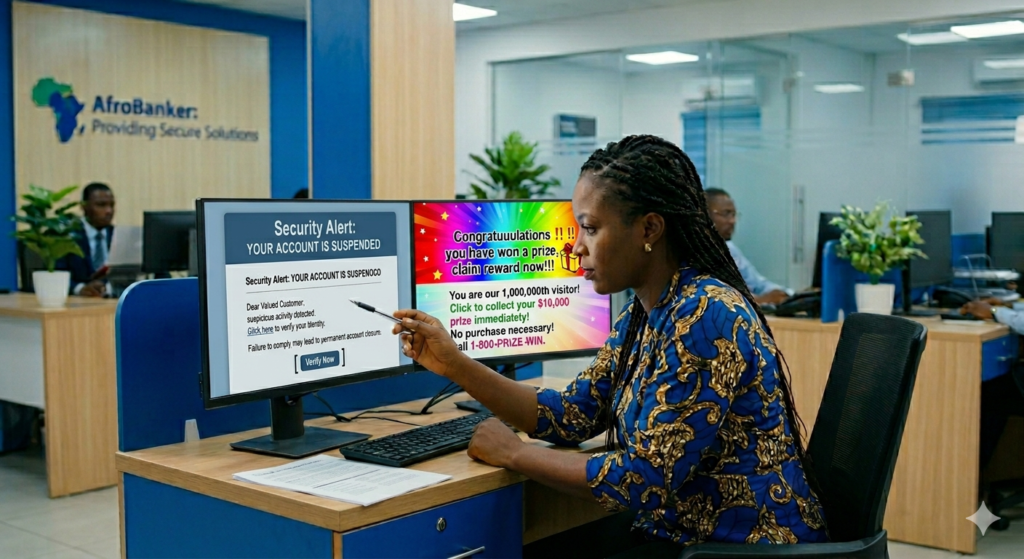
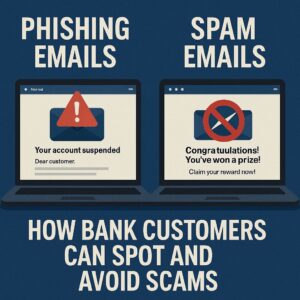
The main difference between phishing vs spam emails is intent. Spam emails are unsolicited junk messages sent in bulk to advertise products or services, presenting a low security risk. In contrast, phishing emails are malicious scams designed to impersonate trusted institutions like banks to steal your sensitive data, login credentials, or money.
| Feature |
Spam Emails |
Phishing Emails |
| Primary Intent |
Advertising and marketing products |
Stealing sensitive data and money |
| Risk Level |
Low (Annoying junk mail) |
Critical (Identity theft and fraud) |
| Targeting |
Sent randomly to massive lists |
Impersonates trusted brands/banks |
In today’s digital banking era, your inbox can either be a tool for convenience or a gateway for fraud. Every day, millions of bank customers receive emails claiming to be from trusted institutions, yet many of these messages are designed to deceive, manipulate, and steal sensitive information. Two of the most common threats are phishing emails and spam emails. While they may look similar at first glance, their intentions and dangers differ significantly. Unfortunately, many customers fail to distinguish between them, leading to costly financial losses and compromised accounts.
For African bank customers, where mobile and digital banking adoption is rapidly growing, understanding these threats is no longer optional, it is essential.
In this guide, I will teach you:
- The clear difference between phishing and spam emails
- How scammers target bank customers
- Practical steps to spot fraudulent messages
- Proven methods to protect your money and identity
What Are Phishing Emails?
Phishing emails are fraudulent messages created to trick you into revealing sensitive information such as your Bank login credentials, ATM card details, OTP (One-Time Password) codes and BVN or personal identity information. These emails often pretend to be from your bank or a trusted institution.
A common Phishing example is when you receive a message saying “Dear Customer, your account has been suspended, click this link immediately to verify your account.”
Key Characteristics of Phishing Emails:
- Urgent or threatening language like “Act now!”
- Fake links resembling bank websites
- Requests for confidential details
- Slightly altered sender email addresses
- Poor grammar or formatting inconsistencies.
The goal of phishing mail is to steal your financial data and access your account.
What Are Spam Emails?
Spam emails are unsolicited bulk messages sent to many recipients, usually for advertising or promotional purposes. Unlike phishing emails, spam is not always dangerous, but it can still be annoying and sometimes risky. Likely examples of Spam Email are:
- “Congratulations! You’ve won a prize!”
- “Earn ₦500,000 working from home!”
- Random product promotions
Key Characteristics of Spam Emails:
Listed below are some of the characteristics of spam emails.
- They are sent in large volumes
- They are often irrelevant to you
- They usually do not request sensitive information directly
- Finally, they may contain promotional links
Spamming mails are used to drive traffic, promote products, or generate clicks.
Bank customers are attractive targets for cybercriminals because they hold financial assets, they frequently receive transaction alerts and emails, many rely on mobile banking apps and some lack awareness of digital security practices. In regions like Nigeria and across Africa, fraudsters exploit trust in banking institutions, limited cybersecurity awareness and urgency around financial transactions. This makes email-based scams highly effective.
The Core Differences: Spam vs. Phishing
While all phishing emails are technically a form of spam (because they are sent unsolicited and often in bulk), they have vastly different motives, risk levels, and consequences. In the broader landscape of digital security, understanding these methods is essential since phishing represents just one of the
most common bank frauds and how to avoid them.
| Feature |
Spam Emails |
Phishing Emails |
| Primary Intent |
To sell, advertise, or promote a product, service, or idea. |
To steal sensitive data, financial info, or login credentials. |
| Risk Level |
Low to Moderate. Mostly harmless junk that clogs up space. |
Extremely High. Can lead to identity theft and drained bank accounts. |
| Targeting |
Sent blindly to massive lists of random email addresses. |
Often mimics trusted institutions, like your specific bank. |
| Tone |
Marketing jargon, casual offers, or “too-good-to-be-true” deals. |
Urgent, alarming, or threatening language demanding immediate action. |
| The Danger |
Annoying, but rarely harmful unless you click questionable ad links. |
Contains fake login portals, malicious attachments, or malware. |
Phishing vs Spam Emails: How Bank Customers Can Spot and Avoid Scams
Every single day, millions of unsolicited emails flood inboxes worldwide. For the average bank customer, opening the inbox can feel like walking through a minefield. While some of these uninvited messages are merely annoying advertisements, others are sophisticated traps designed to empty your bank account. To protect your financial identity, it is critical to understand the difference between spam and phishing, learn how to spot the warning signs, and know exactly what to do when a suspicious email arrives
How to Spot Phishing Emails Instantly
Here are practical red flags every bank customer should watch for in other to spot phishing mails.
1. Suspicious Sender Address. Phishing mails comes with suspicious address. Examples are, support@yourbank.com, support@yourbank-secure-alert.com etc.
2. They always come with urgent or threatening messages. The messages comes like, “Your account will be blocked today” or “Immediate action required”. Scammers use fear to push quick decisions.
3. There is always a fake login links. Try to hover over links before clicking. If it doesn’t match your company or bank’s official website, don’t click it.
4. Phishing mails always requests for sensitive information. No legitimate bank will ask for your passwords, full ATM details and OTP via email.
5. Poor grammar or design are easily noticed. Many phishing emails contain spelling errors, broken layouts and unprofessional formatting.
Red Flags On How Bank Customers Can Spot Phishing Scams
Cybercriminals have become excellent at making fraudulent emails look authentic. They use the logos, color schemes, and layouts of real banks. However, they almost always leave behind a few telltale clues:
- The “Urgent” Account Crisis: The email will claim that your account has been compromised, frozen, or hacked, creating an artificial sense of panic.
- The Fake Lookalike Domain: Always inspect the sender’s address closely. A phishing email might look like it is from
support@yourbank.com, but upon closer inspection, it actually reads support@yourbank.co or swaps letters around (e.g., using an uppercase “I” instead of a lowercase “l”).
- Requests for “Verification”: Real financial institutions never send emails asking you to click a link to “verify” your username, password, PIN, or secure access codes.
- Generic Greetings: If your bank actually emails you about an account issue, they will usually address you by your legal name. Phishing scams often use generic greetings like “Dear Customer” or “Valued Account Holder”.
- Hidden, Spoofed Links: Hovering your mouse cursor over a link (without clicking it) will reveal the actual URL destination. If the pop-up text doesn’t perfectly match your bank’s official website domain, do not click it.
How to Avoid Falling Victim to Email Scams
Staying safe requires a blend of technological guardrails and personal habits. Follow these proactive security steps:
- Never Click or Reply: If an email feels off, do not click any links, open attachments, or reply to the sender. Delete it or report it to your email provider immediately.
- Go Direct to the Source: If an email warns you about a problem with your bank account, close your email client. Open a fresh browser window and manually type your bank’s official web address into the URL bar, or open your official mobile banking app to check for alerts.
- Enable Multi-Factor Authentication (MFA): Ensure MFA is active on all financial accounts. Even if a scammer manages to trick you into revealing your password, they still won’t be able to log in without the secondary token sent to your phone or authentication app.
- Keep Software Updated: Make sure your computer’s operating system, internet browsers, and antivirus software are regularly updated to catch the latest malware and phishing domains.
What to Do If You’ve Been Scammed
If you realize you have already clicked a suspicious link and entered your information, contact your bank immediately using the phone number printed on the back of your debit card. They can freeze your accounts, change your credentials, and help protect your funds before the scammers can act.
How to Protect Yourself from Email Scams
1. Never click suspicious links. Always visit your bank’s website directly instead of using email links.
2. Enable Two-Factor Authentication (2FA). This adds an extra layer of protection for your account.
3. Verify before taking action. If you receive a suspicious email, always call your bank or account officer, or visit your branch or use their official contact channels.
4. Use spam filters. Most email providers automatically filter spam, ensure it is activated.
5. Keep your devices Updated. Updated apps and systems help block security vulnerabilities.
6. Educate yourself regularly. Cyber threats evolve, so stay informed to stay protected.
What To Do If You Fall Victim
If you suspect you’ve clicked a phishing link or shared details, act Immediately by:
- Contacting your bank customer care
- Block your ATM or account (if necessary)
- Change all passwords
- Report the incident to your bank
These quick action can save you and prevent further loss.
Read This Real-Life Scenario
A customer received an email reading, “Dear customer, your account has been restricted due to unusual activity.” The message came with a link that looks like the bank’s official site/portal. The customer panicky clicks on the link, enters his login details and within minutes, unauthorized withdrawals begin.
This is a classic phishing attack disguised as a bank alert.
Frequently Asked Questions (FAQs)
Q1: What is the main difference between phishing and spam emails?
The main difference is intent. Spam emails are unsolicited bulk messages sent to advertise products or services, presenting a very low security risk. Phishing emails are malicious cyberattacks designed to impersonate trusted institutions like banks to steal your sensitive data, passwords, or money.
Q2: Is phishing a type of spam?
Yes, phishing is technically a form of spam because it is sent unsolicited and often distributed in massive volumes. However, while traditional spam is just an annoying marketing nuisance, phishing is an illegal, malicious attempt to defraud you.
Q3: Should I report an email as spam or phishing?
You should always report a fraudulent message as phishing if it tries to steal your data or impersonate a company. In email providers like Gmail, marking an email as phishing triggers advanced security warnings and places alert banners on that email to protect other users, which marking it as spam does not do.
Q4: Can just opening a spam email infect my device?
Simply opening a text-based spam email is highly unlikely to infect your device. The real danger comes if you click on hidden links within the email, download unsolicited attachments (like fake PDFs or zip files), or reply with personal details.
Q5: Why do I keep getting so many spam and phishing emails?
Your email address has likely been leaked in a public data breach, scraped from a website, or sold on a marketing list. Scammers also use automated software to generate millions of random email combinations hoping to hit active inboxes.
Q6: What are the top red flags of a phishing email?
The most common warning signs include:
- High-pressure urgency demanding immediate action.
- Lookalike sender domains (e.g.,
@yourbank.co instead of .com).
- Generic greetings like “Dear Customer”.
- Spelling errors and awkward grammar.
- Links that show a different destination when you hover over them.
Q7: How can I tell if an email from my bank is real or fake?
Look closely at the sender’s exact email address, not just the display name. A real bank email will address you by your actual name, will never include unexpected attachments, and will never provide a link asking you to update your login or payment details.
Q8: What is “Spear Phishing” and how does it differ from regular phishing?
While standard phishing casts a wide net with generic text sent to millions of people, spear phishing is a highly targeted attack. The scammer uses personal details—such as your actual name, job title, or specific banking partner—to make the fraudulent email look incredibly authentic.
Q9: What happens if I click a link in a phishing email but don’t enter data?
Clicking the link can still pose risks, such as downloading background malware onto your device or signaling to the scammers that your email address is active. Run a full antivirus scan immediately and close the webpage.
Q10: What are 5 things a legitimate bank will never ask you via email?
To prevent common bank frauds, a real financial institution will never ask you to:
- Provide your full online banking password or PIN.
- Click a direct link to verify your identity or reactivate a frozen account.
- Email or text your full debit card number or CVV.
- Authorize a test transaction or transfer funds to a “safe account”.
- Download third-party remote access software to fix an issue.
Q11: Can a scammer drain my bank account with just my email address?
No, a scammer cannot access your funds with just your email address. They need your passwords, one-time passwords (OTPs), PINs, or secondary security questions to break into your account.
Q12: Why do phishing emails look exactly like my bank’s official layout?
Scammers use a technique called brand spoofing. They clone the exact HTML code, logos, brand colors, and disclosure footers from real banking websites to manipulate your trust and cause you to lower your guard.
Q13: What should I do if I accidentally gave my banking details to a phishing site?
Act immediately. Call your bank directly using the trusted number printed on the back of your debit card. Inform them that your credentials have been compromised so they can freeze your accounts, cancel your cards, and issue new login profiles.
Q14: How does multi-factor authentication (MFA) protect against phishing?
MFA adds an extra layer of security. Even if a phishing email successfully tricks you into giving away your password, a scammer still cannot log in because they do not have your secondary authorization token (like an SMS code or authenticator app prompt).
Q15: What is the safest way to check if a bank alert email is real?
Ignore any buttons or links inside the email completely. Open a brand new, separate browser window and manually type your bank’s website address into the search bar, or log directly into your official mobile banking application to check your messages.
My Final Advice
In the modern digital landscape, the battle of phishing vs spam emails is no longer just a minor inbox annoyance it is a critical frontline for your financial security. While traditional spam remains a harmless marketing nuisance, phishing is a highly targeted cyber threat designed to exploit your trust and compromise your bank accounts. As cybercriminals develop increasingly sophisticated brand-spoofing techniques, staying safe requires constant vigilance.
Protecting your hard-earned money begins with basic digital hygiene: always double-check sender domains, never click unexpected links, and remember that your financial institution will never ask for sensitive credentials via text or email. By recognizing these subtle red flags and understanding the wider mechanics of most common bank frauds and how to avoid them, you can confidently lock scammers out of your financial life and take control of your digital security.
Phishing and spam emails may appear similar, but understanding their differences can save your finances and identity. As digital banking continues to expand across Africa, customers must take personal responsibility for their security. Always remember, don’t rush when reading emails, always verify before acting, ask questions when in doubt and protect your banking details at all costs. Your awareness is your strongest defense.